
Lesson 3.1: Data preprocessing in Tableau
Objective:
The objective of this chapter is to equip learners with the essential skills and knowledge for effective data pre-processing in Tableau Desktop, focusing on tasks such as splitting fields into multiple columns, changing data types to appropriate ones, making necessary data groupings and so on.
Data preprocessing
Data preprocessing provides the foundation for meaningful and accurate data analysis and visualization. By completing the techniques covered in this chapter, you will be able to enhance the quality of your data, addressing issues such as data inconsistency and incorrect data types. These skills are essential for anyone working with Tableau as they enable a more efficient and accurate exploration of data, leading to more informed decision-making and insightful visualizations. The chapter aims to empower you with the practical skills needed to transform raw data into a format that is optimized for analysis within the Tableau environment.
In the previous chapter, we successfully connected and loaded the data into Tableau Desktop.
After loading the data, before going to start pre-processing, you can utilize Tableau’s “Data Interpreter” to automatically clean and structure your data. To do so:
- Click on the data source tab.

- Check the “Data Interpreter” option. Tableau will analyze and clean the data by handling common issues like headers, footers, and inconsistent data. Above figure has problem with header and inconsistent data. To solve and clean automatically, click on the “Use Data Interpreter” option in the left pane (data source pane).

- After clicking on the checkbox, tableau will start the analyzing and cleaning for formatting automatically. It may take some time depends on the issues in the dataset or the configuration of the computer you are using.

- Finally, tableau will show the cleaned and formatted datasets similarly the following figure.

After checking the processing using default “Use Data Interpreter” then check if there is any other process is needed. In our example, we will perform preprocessing after applying default option. Preprocessing may include a lot of tasks but in this lesson we will explore splitting fields, changing data types and grouping data.
Splitting Fields: It includes splitting the one field or column into multiple. For example, if you need customer first name and last name separately but you have full name. In this cases, this is necessary to split the full name into first name and second name. The process to do so is as follows:
- Identify the fields that need to be split into multiple columns.
- Right-click on the field header and choose “Split.”

- Choose the delimiter (comma, space, etc.) or define a custom split criterion. For me, spiting by space has been performed automatically.
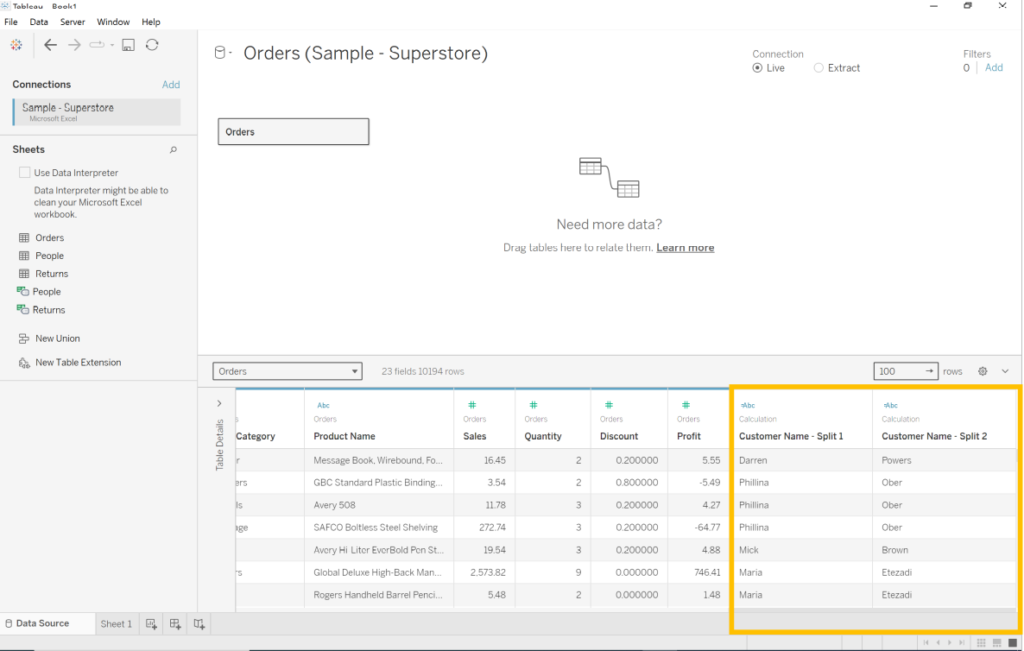

Repeat this process for each field that needs to be split.
Data Type Changes: Usually, there are a lots of multiple data types exist in the dataset. Thus, it is needed to manually check if there is any inconsistent data types. For example, geographical data like country, state and city will maintain with geographic data but if it is still string then it needs to change the type of the column for better understanding and visualization. Let’s perform the follwing steps with the same previous example:
- Examine each column and ensure that data types are appropriate for analysis.
- Right-click on a field and choose “Change Data Type.”

- Select the correct data type for each field (e.g., Date, String, Number, etc.). For us, State/province are the geographic data but in text format.

- It will change the data types to the appropriate one.
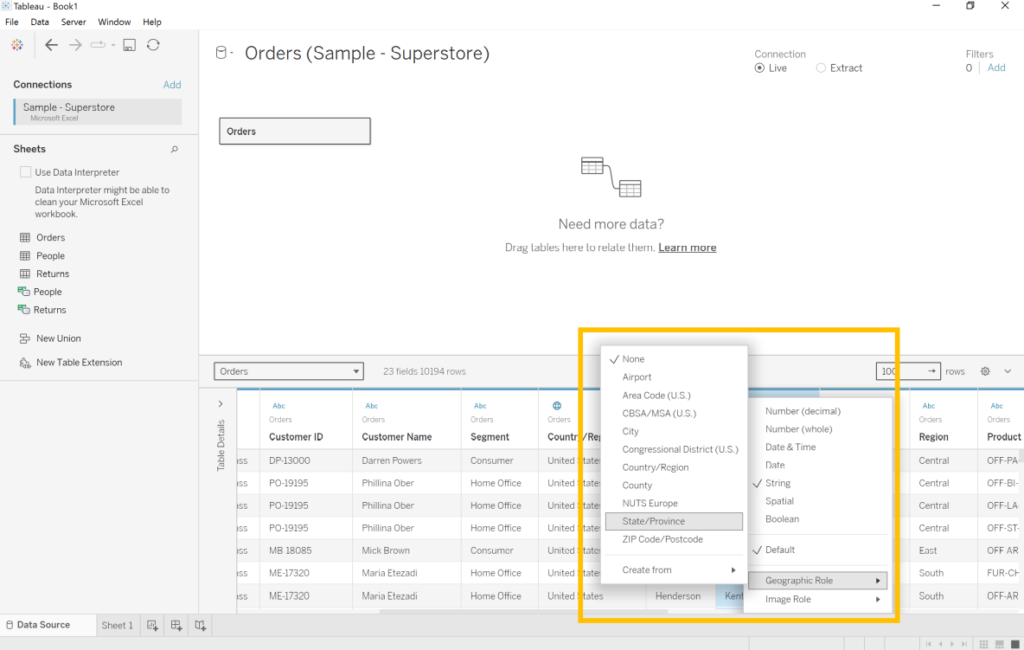
Grouping Data: If necessary, data can be grouped on certain criteria. For example, multiple country can be a part of one group based on geographical area like “Africa, Asia, Middle East”. To do so follow the given instructions below:
- Select the fields you want to group, right-click, and choose “Create” > “Group.”


- Define the grouping criteria and provide a name for the new group.


Finally, you have successfully completed the preprocessing of data. Now, it is time to make relationship, joining and blending for further analysis. We will learn those from next lesson step by step.