
Lesson 2.5: Navigating the Tableau Workspace
Objective:
Lesson 2.5 explores the Tableau Workspace. This session provides a comprehensive exploration of the various components within the Workspace, including the toolbar, data pane, and shelf, unraveling their roles in crafting compelling visualizations. So, In this lesson, we will explore the various components of the Workspace and understand their roles in crafting effective visualizations.
Tableau Workspace
When you initiate Tableau Desktop, a workbook file is automatically created. This workbook encapsulates all your work and accommodates one or more sheets, which can be a worksheet, dashboard, or story.
To the right, there is a blank canvas where you fashion your visualizations, also recognized as “views” or “vizzes”. While the interface includes familiar elements like menus and a toolbar, it also introduces less conventional components such as the Data pane, cards, and shelves.
The image below highlights the major components of the workspace. However, more familiarity will be achieved once we work with actual data.
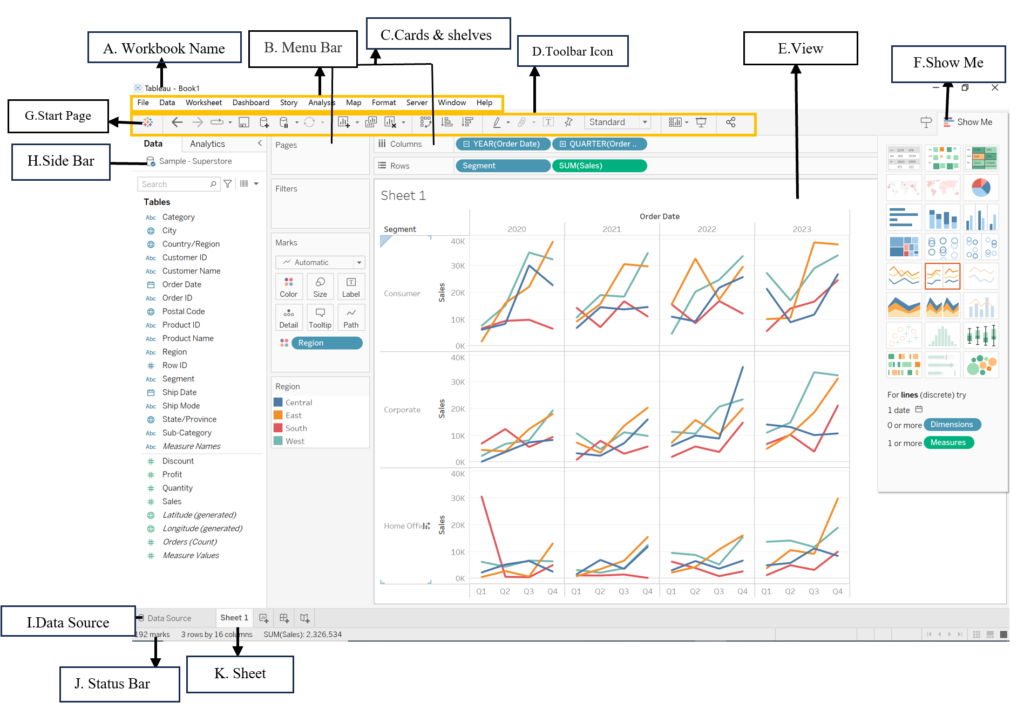
A. Workbook Name:
- Similar to a Microsoft® Excel® workbook, a Tableau workbook contains one or more worksheets, dashboards, or stories, encapsulating all your work. It functions as a file that can be saved and shared, with a blank workbook automatically created upon opening Tableau.
B. Menu Bar:
- The menu bar in Tableau consists of various menus, including File, Data, Worksheet, Dashboard, Story, Analysis, Map, Format, Server, Window, and Help, offering access to diverse functionalities and options within the Tableau interface.
C. Cards & shelves:
- By dragging fields onto cards and shelves, you add data to your visualization. These components structure your visualization, and specific cards and shelves will be explored in more detail in later units.
D.Toolbar Icon:
- The toolbar provides access to commands, analysis tools, and navigation options. Each button on the toolbar has specific functionalities, detailed in the provided toolbar reference table.
E. View:
- The view serves as the canvas where visualizations, or “vizzes,” are created. The finished visualization can encompass charts, graphs, maps, and more.
F. Show Me:
- The Show Me button on the right enables us to customize the type of visualization, providing a useful feature where Tableau suggests available visualization types based on the data.
- Depending on the dataset, not all charts may be accessible. Switching to a different chart is easy — simply select the desired type, and Tableau adjusts the visualization automatically.
G. Start Page:
- Clicking this icon directs you to the Start page, where you can connect to data sources, initiating the data exploration process.
H. SideBar:
- In a worksheet, the side bar incorporates the Data pane and the Analytics pane. It can be expanded or collapsed based on user preference.
I. Data Source:
- Clicking this tab navigates you to the Data Source page, providing a comprehensive view of your data sources.
J. Status Bar:
- Displaying information about the current view, the status bar provides details on the number of marks, rows, columns, and aggregated values in the visualization.
K. Sheet tabs:
- Tabs represent each sheet in your workbook, encompassing worksheets, dashboards, or stories. They facilitate easy navigation and organization within your Tableau project.