
Lesson 1.3: Tableau Products (Tableau Desktop, Tableau Server, Tableau Online)
Objective:
In Lesson 1.3, our goal is to familiarize learners with the various Tableau products—Tableau Desktop, Tableau Public, Tableau Online, Tableau Server, and Tableau Reader. We aim to provide a straightforward understanding of the purpose and features of each product, highlighting their collective contribution to the Tableau ecosystem. So, in this lesson, participants will gain the knowledge needed to make well-informed decisions, choosing the right Tableau products tailored to specific use cases and requirements.
Tableau Product Suite:
Tableau offers a variety of products, each categorized according to its specific functionality. These categories include the server segment, developer tools, viewer capabilities, and data preparation components. This structured classification ensures that Tableau provides specialized solutions for different aspects of data analysis, catering to the diverse needs of users across various stages of the analytics process.
The Tableau Products consists of
- Tableau Desktop
- Tableau Public
- Tableau Online
- Tableau Server
- Tableau Reader
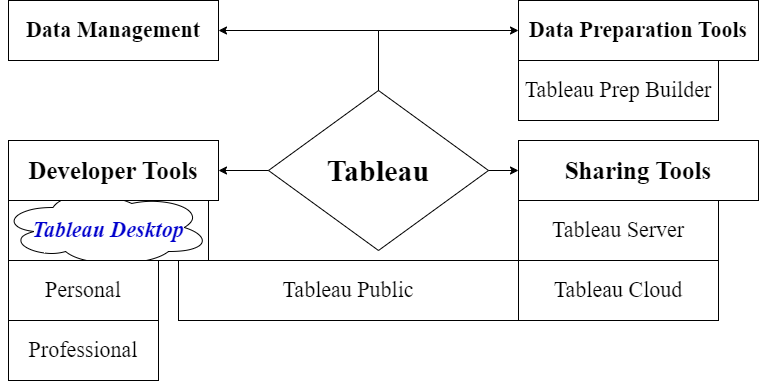
In Data visualizations , Tableau tools can be divided into two categories, which are Developer Tools and Sharing Tools.
- Developer Tools: The Tableau tools that are used for development such as the creation of dashboards, charts, report generation, visualization fall into this category. The Tableau products, under this category, are the Tableau Desktop and the Tableau Public.
- Sharing Tools: As the name suggests, the purpose of these Tableau products is sharing the visualizations, reports, dashboards that were created using the developer tools. The Tableau Products that fall into this category are Tableau Cloud(used to be called Tableau Online), Server, and Reader.
Developer Tools:
- Tableau Desktop : Tableau Desktop has a rich platform for coding and customizing reports, encompassing chart creation, report development, and dashboard integration. It provides a comprehensive workspace for users to execute all necessary tasks seamlessly.
Key Features of Tableau Desktop:
- Rich Feature Set: Boasts a feature-rich environment for creating and customizing reports with ease, offering a variety of tools for chart design and dashboard development.
- Data Connectivity: It enables live data analysis by connecting to Data Warehouses and various file types, ensuring compatibility with diverse data sources.
- Sharing Options: Allows the sharing of workbooks and dashboards either within a private network or publicly, providing flexibility based on user preferences.
Tableau Desktop Versions:
- Personal: Similar development features to Tableau Desktop but keeps workbooks private. Limited access and offline distribution, suitable for Tableau Public sharing.
- Use Cases:
- Personal data exploration and analysis.
- Creating visualizations for personal use or offline sharing.
- Use Cases:
- Professional: Offers robust development capabilities with the added advantage of online or Tableau Server publishing. Provides full access to various data types, ideal for extensive sharing on Tableau Server.
- Use Cases:
- Creating sophisticated and interactive dashboards.
- Publishing work on Tableau Server for organizational access to diverse data.
- Use Cases:
Tableau Public: Tableau Public is a version specifically designed for cost-conscious users. Workbooks created in Tableau Public are saved to the public cloud, allowing anyone to access, view, and download them. This version is ideal for users who wish to share their workbooks, dashboards, and data with the public.
Key Features Tableau Public:
- Free Access: Tableau Public is available for free to anyone who wants to create and share visualizations publicly.
- Public Cloud Storage: Workbooks are saved to the public cloud, enabling universal access for viewing and downloading by anyone.
- Sharing with the Public: Ideal for users who want to share their workbooks, dashboards, and data with the public, fostering collaboration and knowledge sharing.
Sharing Tools:
Tableau Server: Tableau Server is your organization’s powerhouse for sharing, collaborating, and managing data visualizations securely within your company’s network. Whether it’s hosted on-premise or in the cloud, Tableau Server gives you complete control over deployment, configuration, and security. It’s like having your own customizable platform where you can unleash the full potential of your data while ensuring it stays within your company’s firewall.
Use Cases:
Centralized platform for sharing and collaborating on Tableau content.
Customizable reports, collaboration with other designers, and workflow management.
Tableau Cloud: Tableau Cloud, formerly known as Tableau Online, is a tool for sharing server data without limitations. It simplifies data control, decision-making, and collaboration by providing online access to Tableau Server capabilities. Users can prepare, analyze, collaborate, publish, and share data seamlessly.
Use Cases:
Facilitating data control, decision-making, and collaboration from anywhere.
Storing and sharing data on the cloud for enhanced accessibility.
Tableau Reader: Tableau Reader is a free desktop application that allows users to view and interact with Tableau workbooks saved in the Tableau packaged workbook (.twbx) format. It is intended for users who need to view and analyze Tableau visualizations but do not have access to Tableau Desktop or Tableau Server. Tableau Reader provides a convenient way to distribute Tableau workbooks to a broader audience without requiring additional licenses.
Key Features of Tableau Reader:
- Free Viewer: Tableau Reader is a free application available for download from the Tableau website, allowing users to view Tableau workbooks without any licensing costs.
- Interactive Viewing: Users can interact with Tableau visualizations within Tableau Reader, including filtering, sorting, and exploring data.
- Offline Access: Tableau Reader allows users to view Tableau workbooks offline, making it convenient for sharing visualizations in environments without internet access.